Build your trading system, one trade at a time.

Connect Binance or Bybit and your dashboard fills itself in. Add a quick plan and review, and spot the mistakes you keep repeating.

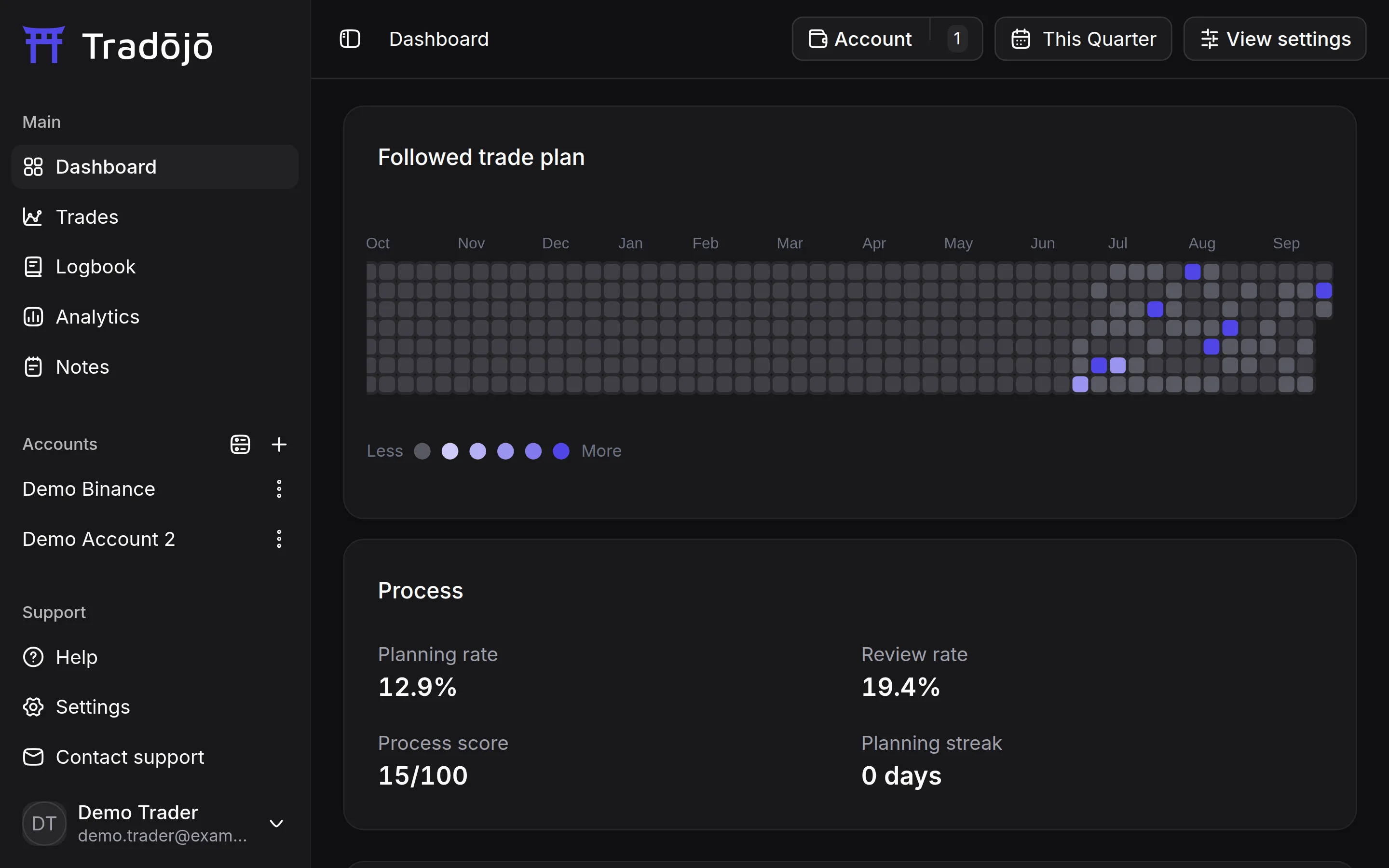
The Tradojo dashboard for a demo Binance account, showing the plan-and-review calendar and process stats.

Syncs futures trades from Binance and Bybit, and imports Breakout from a CSV export. More exchanges are coming.

The problem

A journal only helps if it's complete

Logging trades by hand is slow, so the spreadsheet falls behind after a busy week. By the time you sit down to review, the context is gone: why you entered, what you planned, where the fees went. Without that record, you can't see a mistake you keep repeating.

  1. The log falls behind.

    Typing every fill by hand gets skipped when you're busiest.

  2. Costs go missing.

    Commission and funding rarely make it into a hand-kept P&L.

  3. Mistakes stay invisible.

    If nobody writes them down, nobody can count them.

How it works

Your trades, synced. Your process, built.

  1. Connect your account, and your trades come in.

    Connect Binance or Bybit futures with a read-only API key, and your orders, fills, commission and funding sync on their own, grouped into trades. Breakout trades import from a CSV export.

  2. Plan before, review after.

    Add a short plan before each trade and a short review after it. Your Planning rate, Review rate and streak track how consistently you do it.

  3. Tag mistakes, see their Net P&L.

    Tag the mistakes you made on each trade, and see the Net P&L of the trades tagged with each one, after fees and funding.

Dashboard and analytics

All your numbers on one screen

The dashboard shows Win rate, Net P&L, R-multiple, Avg win, Avg loss, Profit factor and Expectancy for the account and date range you pick. A heatmap shows your daily P&L, and the cumulative P&L chart shows the whole run. See how many of your trades you planned and reviewed, and keep the chain going. Analytics breaks results down by setup, mistake, tag, symbol, time and risk.

  • Net of costs. Net P&L counts commission and funding fees.
  • Break-evens counted separately. A trade whose net P&L is inside your own break-even threshold is shown as break-even (e.g. 39W / 53L / 2BE), and Win rate counts it as a non-win. With no threshold set, only exactly $0 counts.
  • Time breakdowns. Results by weekday, hour of day and trade duration.
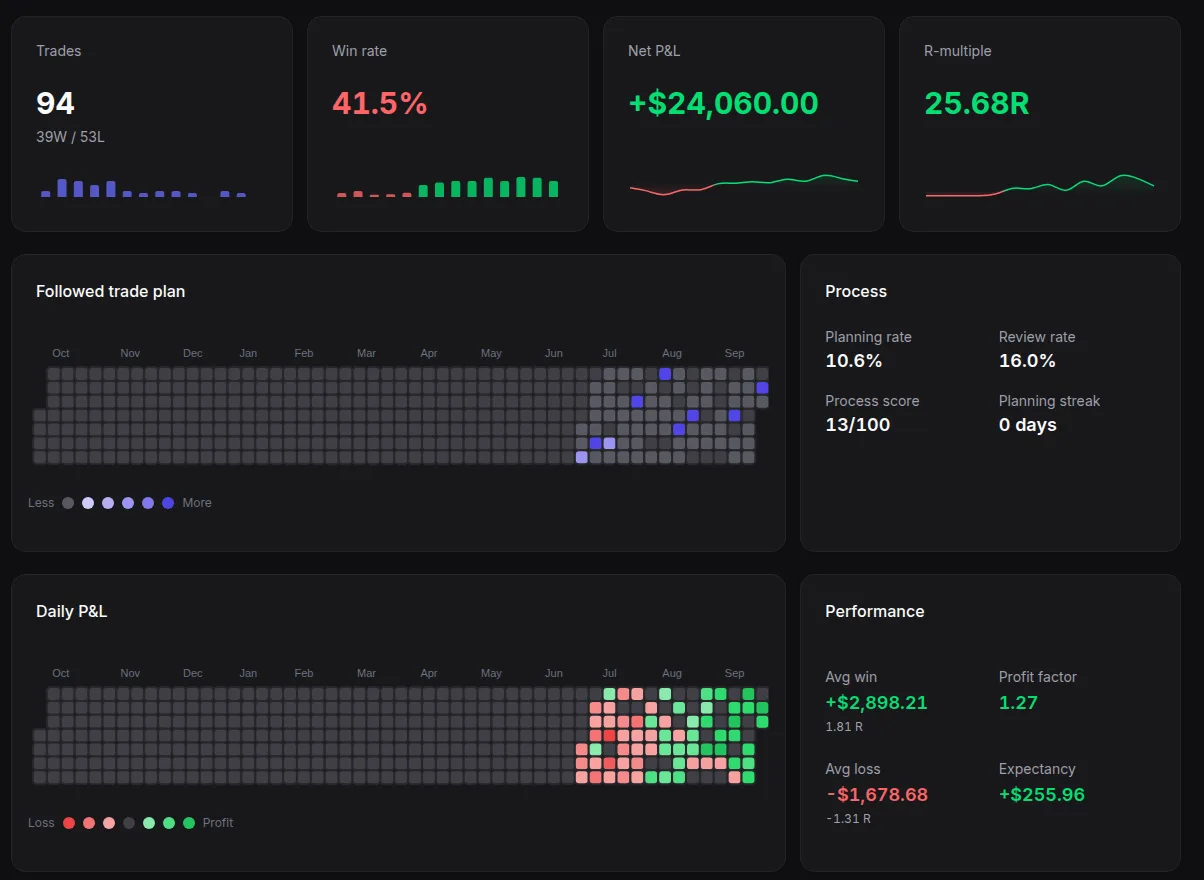
The Tradojo dashboard for a demo account: Trades, Win rate, Net P&L and R-multiple cards, the plan-and-review calendar, Process stats, the Daily P&L heatmap and the Performance card with Avg win, Avg loss, Profit factor and Expectancy.
Trade detail

Every trade, fill by fill

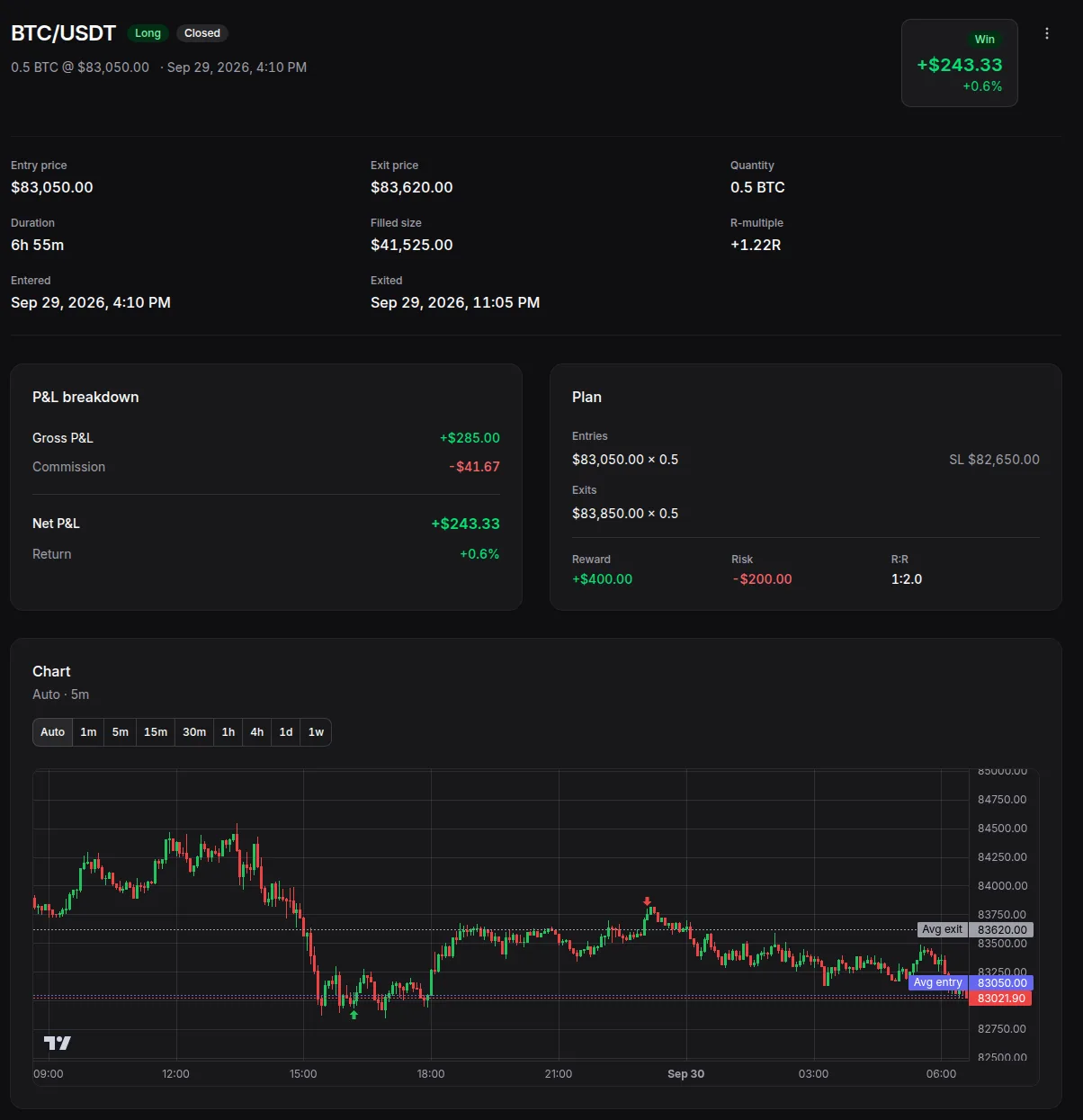
Open a trade to see its executions, P&L breakdown, plan and review on one page. Every closed Binance and Bybit trade gets a candlestick chart that marks each buy and sell with your average entry and exit. Charts are built with TradingView Lightweight Charts™.

  • Where the money went. Gross P&L, commission and funding fees, down to net P&L.
  • Your plan next to the result. Planned entries, stop loss and exits, with reward, risk and R:R.
  • Your time zone. Trade times are shown in your own time zone.
A closed demo BTC/USDT long in Tradojo: entry and exit prices, the P&L breakdown, the trade plan (reward, risk and R:R) and a 5-minute candlestick chart marking the buy, the sell, the average entry and the average exit, with the TradingView logo.
Mistakes and tags

Name your mistakes, then count them

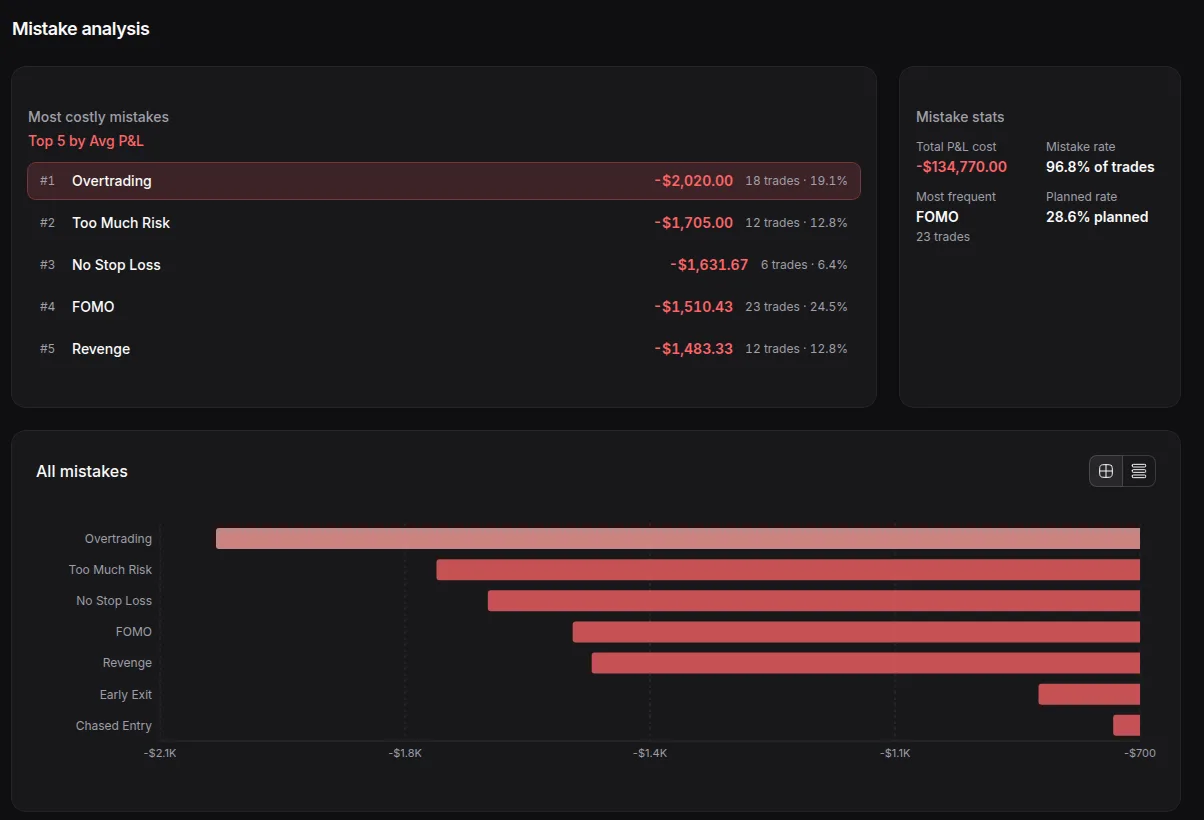
Tag each trade with a setup, any mistakes and your own custom tags. The Mistakes tab in Analytics shows your Mistake rate and your most frequent mistake. It also ranks your top 5 mistakes by average P&L.

  • Mistake rate, defined. The share of closed trades tagged with at least one mistake. Each trade counts once, however many mistakes it has.
  • Your own tags. Create, edit and delete setups, mistakes and tags in Settings → Tags.
  • Filter by any tag. Narrow the trade list and analytics to one setup, mistake or tag.
The Mistakes tab in Tradojo Analytics for demo data: the top 5 mistakes by Avg P&L, a bar chart of all mistakes and Mistake stats with the Mistake rate and most frequent mistake.
Plan and review notes

Write the plan before. Write the review after.

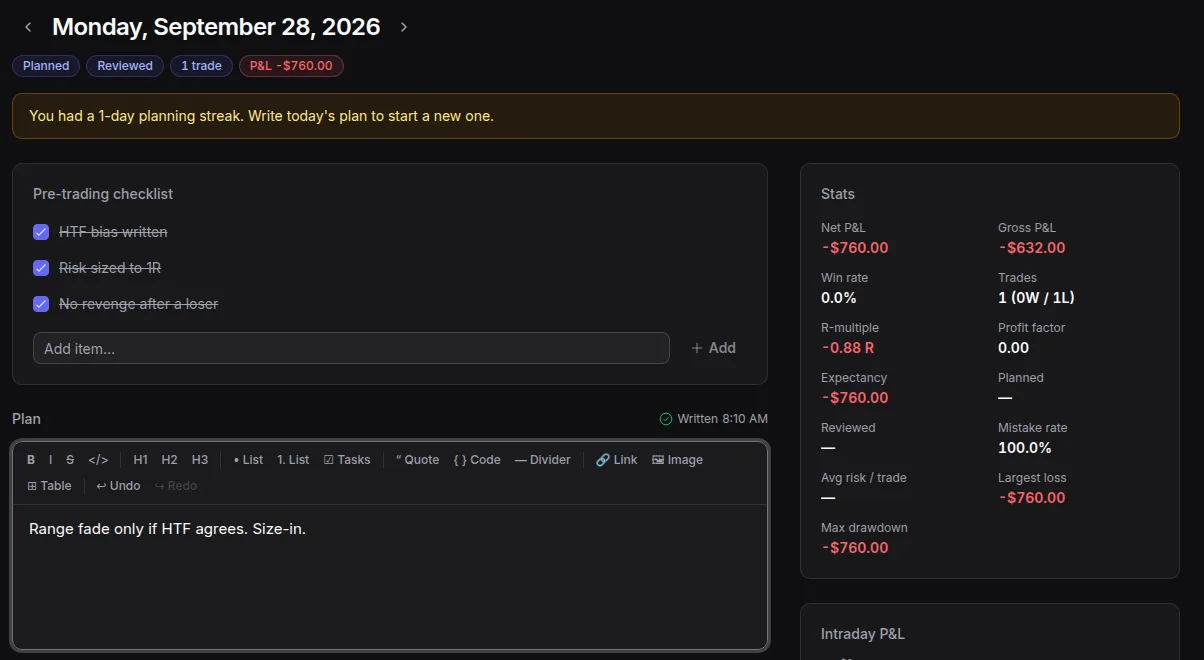
Every trade has a Trade plan and a Trade review. In the Logbook, each day gets a checklist for before and after trading, a plan and a review, next to that day's trades and stats. Format notes with lists and checklists, add links and drop in a TradingView snapshot or an image.

  • Standalone notes. Write weekly reviews or playbooks, tag them and link them to trades by searching for the symbol.
  • Track the habit. Planning rate, Review rate and your streak show how consistently you plan and review.
  • Daily to yearly. Look back by day, week, month or year in the Logbook.
A daily Logbook entry in Tradojo: the streak prompt, a pre-trading checklist, the Plan editor with its formatting toolbar, and the day's stats.
Setups and tags

See which setups and tags work for you

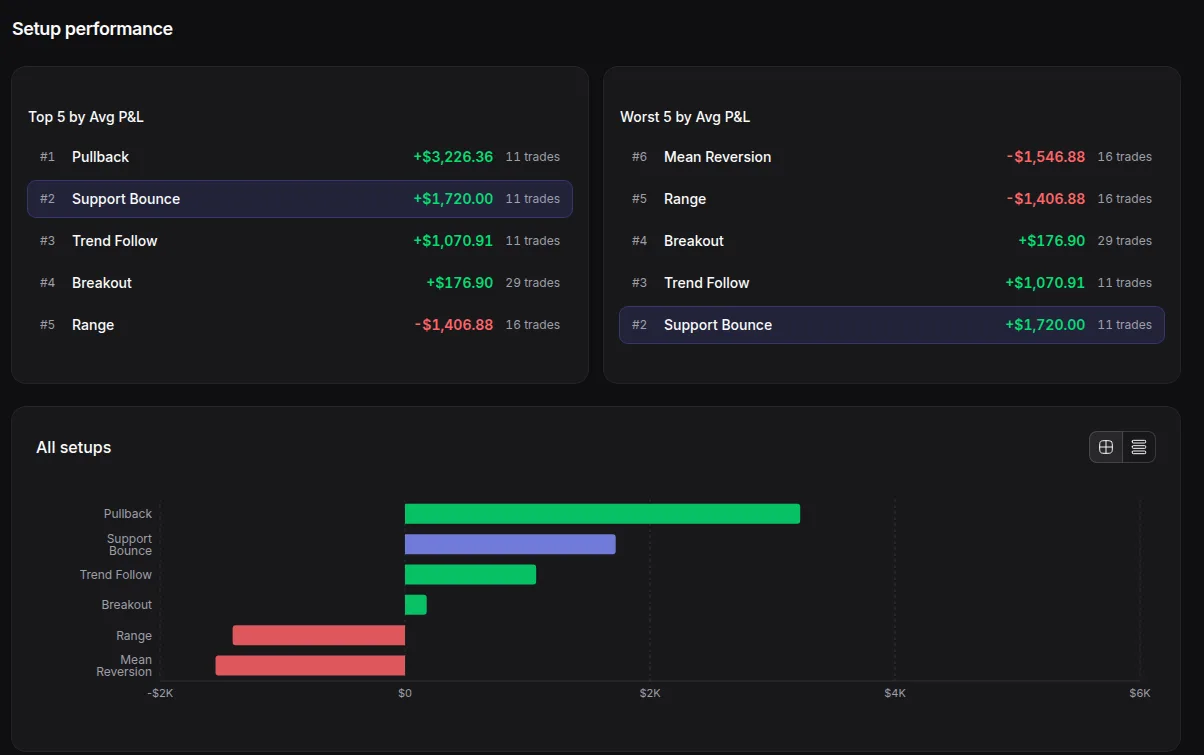
The Setups tab in Analytics ranks your setups by average P&L and shows each one's Win rate, Profit factor and results over time. The Tags tab does the same for your tags, with each tag's Avg P&L and Win rate next to your overall numbers.

  • Top and worst setups. Ranked by Avg P&L.
  • One setup, broken down. Results by symbol, side and weekday.
  • Tags over time. Each tag's results, charted over time.
The Setups tab in Tradojo Analytics for demo data: the top 5 and worst 5 setups by Avg P&L and a bar chart of all setups.
Exchanges and sync

Binance and Bybit futures sync. Breakout imports from CSV.

Connect your Binance or Bybit futures account with a read-only API key. Tradojo reads your orders, fills and funding and groups them into trades. Breakout trades (crypto perpetuals) import from a CSV export. You can journal several accounts in one place and filter the dashboard by account. More exchanges are coming.

  • Binance

    USDⓈ-M perpetuals

    API sync Live on paid plans, daily on Free
  • Bybit

    Linear perpetuals

    API sync Live on paid plans, daily on Free
  • Breakout

    Crypto perpetuals

    CSV import Doesn't use a sync slot
  • Live sync or daily sync. On paid plans, Binance and Bybit accounts sync live over WebSocket. The Free plan has 1 account with daily sync.
  • Read-only keys only. We only accept read-only keys, and your keys are encrypted at rest (AES-256-GCM).
  • Clear setup steps. The connect screen tells you which read-only permissions to turn on and which to leave off.
Pricing

Start free, upgrade for live sync

Free

$0

1 account, daily sync.

Starter

$29 /mo

2 live-sync accounts.

Premium

$49 /mo

5 live-sync accounts.

Yearly billing gets 2 months free. 7-day free trial on Starter and Premium. Card required, cancel anytime.

See pricing
FAQ

Common questions

Is it safe to connect my exchange?

We only accept read-only API keys. Tradojo stores your email, the API keys you connect (encrypted at rest with AES-256-GCM), the trade history it syncs from your exchange (such as orders, fills and funding) and the trades you import from a CSV export, plus any notes you add. Our privacy policy has the full list.

Which exchanges does Tradojo support?

Binance (USDⓈ-M perpetuals) and Bybit (linear perpetuals) sync automatically. Breakout trades (crypto perpetuals) import from a CSV export. More exchanges are coming.

What does Tradojo sync?

For Binance and Bybit futures: your orders, fills, commission and funding payments, grouped into trades, plus price data for each closed trade's chart. Breakout trades come from the CSV export you import.

Do I still have to enter trades by hand?

Not for Binance and Bybit accounts: their trades sync on their own. Breakout trades import from a CSV export. What you add is the part only you know, like your plan, tags and review.

Can I journal more than one account?

Yes. Each account shows up in the sidebar, and you can filter the dashboard and analytics by account. How many exchange accounts you can sync depends on your plan.

Is there a free plan or a trial?

Yes. You can start free with one exchange account. The pricing page has the details on the paid plans and trials.

Does Tradojo tell me what to trade?

No. Tradojo records and analyses the trades you've already made. It doesn't send signals or give advice. Trading involves risk, and you can lose money.

Can I cancel?

Yes. You can cancel a paid plan at any time from Settings → Billing, through the Paddle customer portal.

Start your trading journal

Connect Binance or Bybit and your trades start syncing, or import your Breakout CSV.